
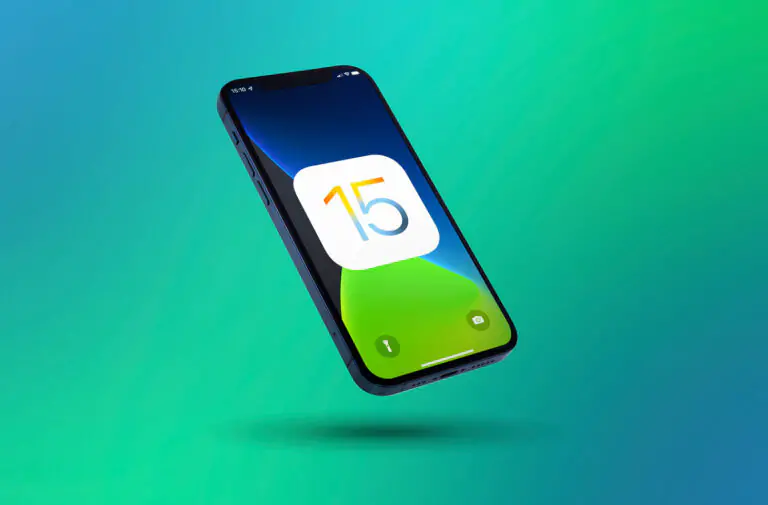
iOS 27 came out on September 14, 2026, as a free update. It runs on iPhone 11 and every newer model, plus the iPhone SE (2nd and 3rd generation) — the same list as iOS 26. The headline feature, Siri AI, doesn’t work on all of them: you need an iPhone 15 Pro, 15 Pro Max, or iPhone 16 or later, with the iPhone and Siri language set to English.
Which iPhones support iOS 27
Compared with iOS 26, Apple hasn’t dropped a single model. But system compatibility and access to Apple Intelligence are two different things: on the iPhone 11–14, iPhone SE, iPhone 15 and 15 Plus, iOS 27 runs without Siri AI and the new AI features.
| Model | iOS 27 | Apple Intelligence and Siri AI |
|---|---|---|
| iPhone 11, 12, 13 and 14 — all models | Yes | No |
| iPhone SE (2nd and 3rd generation) | Yes | No |
| iPhone 15 and 15 Plus | Yes | No |
| iPhone 15 Pro and 15 Pro Max | Yes | Yes |
| All iPhone 16 models, including 16e | Yes | Yes |
| iPhone 17 and 17e | Yes | Yes |
| iPhone 17 Pro, 17 Pro Max and Air | Yes | Yes, with expressive Siri voices |
| iPhone 18 Pro, 18 Pro Max and Duo | Yes, Duo ships with iOS 27.1 | Yes, with expressive Siri voices |
| iPhone XR, XS and XS Max | No, they stay on iOS 18 | No |
The newest models released so far — the iPhone 18 Pro and 18 Pro Max — went on sale on September 18 and run iOS 27 out of the box. The foldable iPhone Duo goes on sale on October 23 with iOS 27.1 — more in “iPhone Duo: price, release date and specs.”
The iPhone XR, XS and XS Max got neither iOS 26 nor iOS 27 and stay on iOS 18. Apple ships their security fixes in that branch: the latest, iOS 18.7.10, came out on August 17, 2026.
What’s new in iOS 27
Siri AI
Siri AI is a new version of Siri built on the next generation of Apple Intelligence, still in beta for now. You can talk or type to it in a back-and-forth conversation: it draws on personal context from Messages, Mail, Photos, Calendar and Notes, understands what’s on your screen, takes actions in apps and looks up fresh information on the web.
Siri now has its own app that syncs conversation history through iCloud, so a chat started on iPhone can continue on a Mac, iPad, Apple Watch or Apple Vision Pro. The Camera app gets a Siri mode: point it at something and ask — for example, about the nutritional value of a dish. Write with Siri drafts text from a description, edits it and reviews your writing almost anywhere you type.
Apple Intelligence in apps
Photos adds Spatial Reframing, which changes a shot’s composition as if the camera had moved, and Extend, which fills in the frame beyond its edges. Clean Up can now remove even large objects. Image Playground has a new generative model and creates images in almost any style, including photorealistic.
Safari groups your tabs by topic on its own, and Notify Me watches a page and alerts you to, say, a price drop or an item back in stock. Call Context shows relevant details from your apps when you call a business — for example, a confirmation code from an airline’s email.
Parental controls
When setting up an iPhone for a child, parents choose exactly which apps the child can use and can add more later. If Ask to Browse is on, a child needs a parent’s approval to open each new website in Safari. Communication Safety now also blocks gore and violence in shared photos and videos.
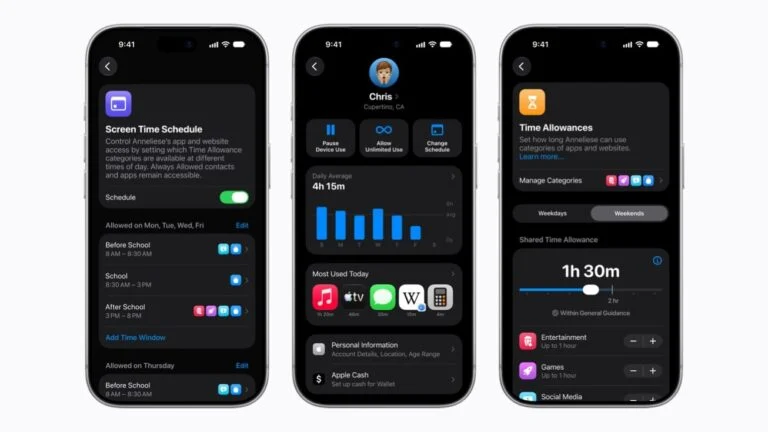
Screen Time has been redesigned: parents see at a glance how much time their child spends on the device on average and which apps they use most. Daily limits (Time Allowances) cover entertainment apps, games and social media, with age-based guidance, and Schedules set which apps are available at different times of day, on weekdays and weekends. More in “Apple updates child safety: new Screen Time and Family Sharing features.”
Speed and interface
In Apple’s testing, apps launch up to 30% faster — and that figure comes from an iPhone 11 Pro Max, comparing iOS 26.6 with a prerelease version of iOS 27. New photos load in the Photos library up to 70% faster (tested on iPhone 15), and AirDrop transfers are up to 80% faster (iPhone 16 Plus).
Apple refined Liquid Glass for better readability, and a new slider in Settings adjusts its look from ultra-clear to fully tinted. Search in Spotlight, Photos and Mail returns more relevant results, the iPhone switches between Wi-Fi and cellular more smoothly, and alarms and timers now have their own volume setting.
Limits by model, language and region
For Russian- and Ukrainian-speaking users, the biggest limitation is language. Apple Intelligence supports English, Danish, Dutch, French, German, Italian, Norwegian, Portuguese, Spanish, Swedish, Turkish, Vietnamese, Chinese (simplified and traditional), Japanese and Korean. Russian and Ukrainian aren’t on the list, and the iPhone language and Siri language must match.
For now, Siri AI works only in English: Apple says French, Japanese, Korean, Portuguese and Spanish are coming in October. To use the new Siri today, switch both the iPhone language (Settings → General → Language & Region) and the Siri language to English. Until the new Siri language finishes downloading, Apple Intelligence may be unavailable.
Some capabilities depend on the model. Expressive Siri voices (with adjustable pace and expressivity) and more accurate dictation work only on the iPhone 17 Pro, 17 Pro Max, Air, 18 Pro, 18 Pro Max and Duo, which run Apple’s most powerful on-device model. Apple Intelligence needs up to 8 GB of storage, or up to 14 GB on the iPhone 17 Pro, 17 Pro Max and Air.
Some features work only in English even among the supported languages: Mail suggestions, personalized Smart Reply in Messages, Siri mode in Camera and Visual Intelligence. Splitting a bill and paying friends with Apple Cash in Siri mode is available only in the US.
How to turn on Siri AI
Siri AI doesn’t turn on by itself after the update. Make sure that:
- you have an iPhone 15 Pro, 15 Pro Max, any iPhone 16 or a newer model running iOS 27;
- your iPhone language and Siri language are English;
- you don’t live in the EU, and your Apple Account region isn’t mainland China;
- you’re at least 13.
Then open Settings → Siri and tap Try Siri AI (Beta) — once you switch the language, the menus are in English. If Siri is off, tap Turn On Siri first. Next, pick a voice, complete voice enrollment and review your privacy settings. Your iPhone then joins a waitlist: Apple says wait times vary, and Siri AI downloads automatically when your turn comes.
How to update your iPhone to iOS 27
Back up your iPhone
The easiest option is iCloud: open Settings, tap your name, then choose iCloud → iCloud Backup → Back Up Now. Stay connected to Wi-Fi until the backup finishes. You can also back up to a computer: on a Mac, use the Finder; on a Windows PC, use the Apple Devices app (or iTunes if you don’t have it).
Connect to power and Wi-Fi
Apple recommends plugging your iPhone into power and connecting to the internet over Wi-Fi before you update. If a message asks to temporarily remove apps to make room for the update, tap Continue: the apps are reinstalled automatically after installation.
Open Software Update
Go to Settings → General → Software Update. Your iPhone shows only the updates compatible with your model. If there are two options, the iOS 26 update is listed first and the upgrade to iOS 27 appears at the bottom of the screen.
Install iOS 27
Choose iOS 27, tap Download and Install, enter your passcode and follow the onscreen instructions. If the update has already downloaded, choose Update Now or Update Tonight. Your iPhone restarts during installation — don’t turn it off until the process is complete.
Give your iPhone time after the update
Right after a major update, your iPhone may drain its battery faster and run warmer. Apple says this is normal: in the background it’s indexing data and files for search, downloading new assets and updating apps.
If iOS 27 doesn’t show up in the list, check whether a VPN or proxy is on: Apple says they can prevent your iPhone from reaching the update servers. You can also update from a computer — with the Finder on a Mac running macOS Catalina or later, or with the Apple Devices app or iTunes on a Windows PC.
Should you update right away
There’s no rush. Alongside iOS 27, Apple released iOS 26.7 for the same models, so you can stay on iOS 26 and keep getting security fixes. Apple says that after a new major version comes out, it keeps offering security updates for the previous one for a period of time, but it doesn’t say how long.
As of September 22, 2026, Apple hasn’t released any fixes for iOS 27 — the initial release is current. If you rely on your iPhone for work, banking apps, a VPN or a corporate profile, it’s wise to wait for the first fixes and for updates to the apps you need. If the new features matter and you have a fresh backup, you can install iOS 27 now.
Sources and methodology
Analysis of public sourcesChecked 22 September 2026
- Apple Newsroom — Major updates for Apple’s software platforms are now available, September 14, 2026 apple.com
- Apple — iOS 27: features and compatible iPhones apple.com
- Apple Support — About iOS 27 Updates support.apple.com
- Apple Support — How to get Siri AI support.apple.com
- Apple Support — Update your iPhone or iPad support.apple.com
FAQ
Can I install iOS 27 on an iPhone 11?
Yes. iOS 27 supports the iPhone 11, 11 Pro and 11 Pro Max, every newer model and the iPhone SE (2nd and 3rd generation). Siri AI and Apple Intelligence don’t work on the iPhone 11: they require an iPhone 15 Pro or later.
Which iPhones won’t get iOS 27?
The iPhone XR, XS, XS Max and older models. The XR, XS and XS Max stay on iOS 18 and still get security fixes: the latest, iOS 18.7.10, came out on August 17, 2026.
Why don’t I have Siri AI on my iPhone?
You need an iPhone 15 Pro, 15 Pro Max, iPhone 16 or later, with the iPhone and Siri language set to English. Then turn on Siri AI in Settings → Siri → Try Siri AI (Beta) and wait for your turn. Siri AI isn’t available yet on iPhone in the EU, with an Apple Account region of mainland China, or for users under 13.
Does Apple Intelligence work in Russian or Ukrainian?
No. Apple Intelligence supports English, French, German, Spanish, Japanese, Korean, Chinese and several other languages, but not Russian or Ukrainian. To use its features, switch your iPhone and Siri language to a supported one — and, for Siri AI, to English for now.
Can I stay on iOS 26?
Yes. Alongside iOS 27, Apple released iOS 26.7 for iPhone 11 and later, and you can install it from Software Update. Apple says security updates for the previous version keep coming for a period of time.



Leave a Reply